The Friction Audit for Creators
 Allie Miriam

A practical audit for finding the drag inside your workflow so you can fix what’s actually making the work harder than it needs to be.
The Friction Audit for Creators
A practical audit for finding the drag inside your workflow so you can reduce what’s making the work harder than it needs to be.
Most creators assume the problem is discipline.
They think:
I need to be more consistent.
I need to focus better.
I just need to follow through.
But when work feels heavier than it should, that’s usually not a discipline problem.
It’s friction.
Friction is what makes simple work feel difficult. It’s the extra steps, repeated decisions, unnecessary setup, and hidden effort inside your workflow.
And most of the time, you don’t notice it.
You just feel the weight.
This isn’t about fixing everything at once. It’s about making your work easier to continue inside real life.
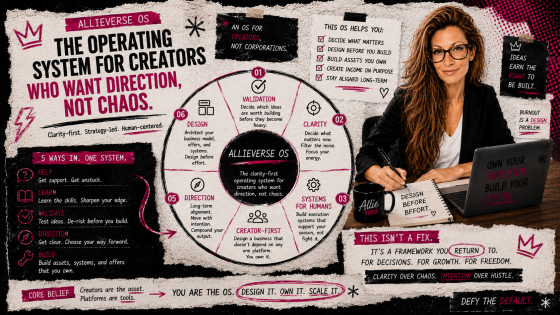
This post is part of the AllieVerse OS, a clarity-first operating system for creators who want direction instead of chaos.
The OS is made up of six core components that govern how decisions get made inside a creative business: Validation, Clarity, Systems for Humans, Creator-First, Direction, and Design.
These are not steps to complete. They are components that work together to support how decisions are made across your business.
You can explore a quick overview of the full system here, or read the in-depth breakdown of every component here.
This post focuses on the Systems for Humans component, and how to identify the hidden drag that makes your workflow harder to follow than it needs to be.
The 6 Core Components
- Validation – Ideas earn the right to be built.
- Clarity – Thinking beats hustling.
- Systems for Humans – Systems are creative tools, not cages.
- Creator-First – The creator is the asset. Platforms are tools.
- Direction – Consistency without direction is busywork in public.
- Design – Burnout happens when effort replaces design.
The Core Rule
Friction is a design signal, not a personal failure.
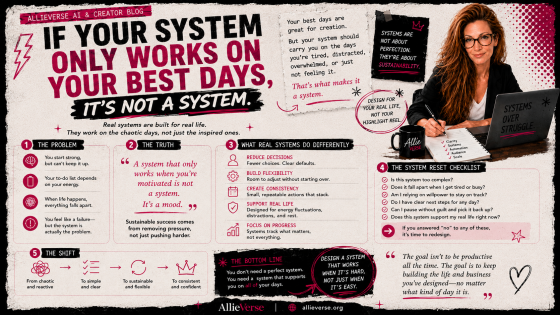
If a workflow only works when you are focused, motivated, caught up, and uninterrupted, it is carrying too much friction.
A system that survives average days is the goal.
How to Run the Friction Audit
Choose one recurring workflow.
Not your whole business. One process.
Before you improve a system, make sure it’s something that actually deserves to exist.
Examples:
- writing a blog post
- sending a newsletter
- creating a product
- posting content
- onboarding a client
- handling weekly admin
Then audit it across the seven friction points below.
For each one, score it:
- 0 = clean
- 1 = some drag
- 2 = high friction
At the end:
0–4 = workable
5–8 = needs simplification
9–14 = your workflow is doing too much work before the work even begins
69fe679e21b7c_lg.png)
1. Start Friction
Can you begin without a long setup?
- Do you know exactly how to start?
- Can you begin in under five minutes?
- Does starting require searching, organizing, or deciding first?
- Do you avoid this task because starting feels like a project?
Adjustment: Shorten the path to starting. Define the first action clearly.
2. Decision Friction
How many choices are required before progress happens?
- Are you re-deciding the same things every time?
- Are there too many options inside the workflow?
- Do you lose time choosing instead of doing?
Adjustment: Set defaults. Create templates. Reduce options.
3. Tool Friction
Are your tools helping or becoming part of the task?
- Are you using more tools than necessary?
- Does your setup require switching between multiple places?
- Are you maintaining tools more than using them?
Adjustment: Reduce tools. Keep the workflow in fewer places.
4. Handoff Friction
Does the task move cleanly from one step to the next?
- Do you know what happens after each stage?
- Do tasks stall between draft, edit, publish, or follow-up?
- Do you lose momentum in transitions?
Adjustment: Define the next step. Make transitions explicit.
5. Recovery Friction
Can you return to the work easily after interruption?
- Can you stop mid-task without losing your place?
- When you come back, is it obvious what to do next?
- Does interruption force you to restart?
Adjustment: Leave clear restart points. Make resuming easy.
6. Capacity Friction
Does this workflow fit real human energy?
- Can you do this on an average day?
- Does it assume perfect focus or long time blocks?
- Does it require motivation to get through it?
Adjustment: Scale the process to match real capacity. Lighten the steps.
7. Maintenance Friction
How much upkeep does this workflow require?
- Does it create ongoing admin just to function?
- Are you constantly organizing, updating, or tracking?
- Is the system becoming its own task?
Adjustment: Remove unnecessary upkeep. Simplify what needs to be maintained.
Audit Summary
1. Identify the highest friction point
Where is the most drag?
2. Adjust one thing
Not the whole system. One source of friction.
- remove one step
- eliminate one tool
- set one default
- define one restart point
3. Reduce, don’t rebuild
Most workflows don’t need to be replaced. They need to be simplified.
What This Changes
When friction is reduced:
starting takes less effort
progress requires fewer decisions
interruptions don’t reset everything
consistency becomes easier to maintain
Not because you became more disciplined.
Because the work became easier to continue.
Bookmark This
Bookmark this post and run the audit before you blame yourself, rebuild your workflow, or assume you need more discipline.
Start Here
If you want the full system context, start with the OS pillar.
Read the AllieVerse OS pillar post
Then come back to this audit any time your workflow starts feeling heavier than it should.
Categories: AllieVerse OS
Categories: : Systems for Humans