AI is Fast. Strategy Makes It Useful
 Allie Miriam
See how AI can turn pillar blog posts into usable infographics and visual content assets when guided by strategy, brand clarity, and systems for human
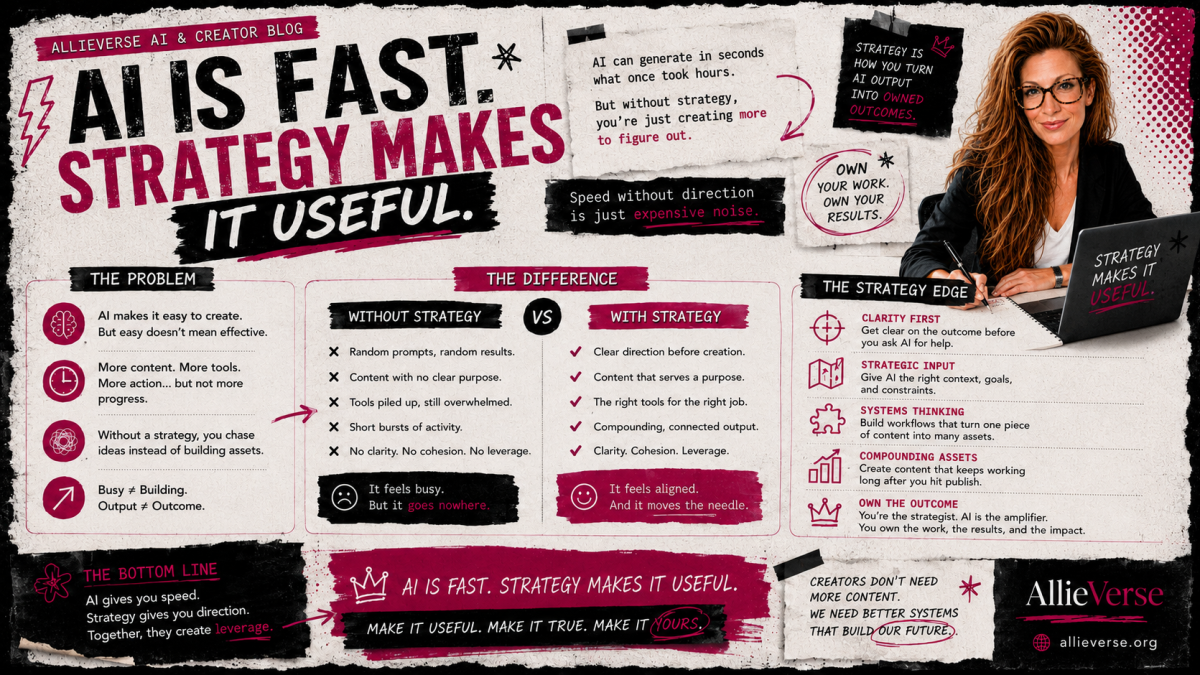
AI Is Fast. Strategy Makes It Useful.
I created a set of branded infographics for my pillar blog posts using ChatGPT.
And yes, the assets came together fast.
Seconds fast.
But that is not the real story.
The real story is not, “Look what this prompt did.”
I got the spark for this experiment after reading AI Meets Girlboss on Substack, specifically the post “ChatGPT Images 2.0 Just Made Me Reconsider…”. That post sent me down the rabbit hole of testing what AI image generation could do when it was paired with existing content strategy instead of treated like a novelty button.
The real story is this:
AI did not create my content strategy. It helped me extend it.
That distinction matters, especially for creators who are being told that the next magic prompt, tool, or workflow is going to solve the whole content problem.
It will not.
A prompt can help you produce something. Strategy helps you know whether that something is useful.
The experiment
I had already written a set of pillar blog posts for the AllieVerse OS, my creator-first operating system for building with more clarity, less chaos, and fewer tabs open in emotional self-defense.
Those posts were not random content pieces. They were part of a larger system.
Each one had a job.
Each one explained a core idea.
Each one gave creators a way to think, decide, or move differently.
The posts included concepts like:
- Idea validation
- Business clarity
- Sustainable systems
- Platform strategy
- Direction
- Design
Once the written pillar content existed, I wanted to turn those ideas into visual assets that could make the concepts easier to understand, easier to remember, and easier to reuse across the site and beyond.
So I used ChatGPT to create infographics for each post.
Not from thin air.
Not from a vague “make me something cool” request.
From existing strategy.
The prompt was simple because the strategy was doing the heavy lifting
Here is the kind of prompt I used:
Read this post and create an infographic that helps the reader understand the main message: [BLOG POST URL]
Create the infographic in the same style as the attached image, but make it unique in its presentation.
That is not a wildly complicated prompt.
There is no secret prompt library hidden behind a paywall.
The reason it worked is because the foundation was already there.
I had:
- Pillar content already written
- A clear audience
- A clear brand point of view
- A defined visual direction
- A content system the assets could plug into
- A specific purpose for each graphic
- A real place for the finished assets to live
That is the part people skip when they talk about AI.
They focus on the prompt.
But the prompt is only the lever.
Strategy is the machine.
AI works better when it is not starting from zero
One of the biggest myths about AI content creation is that the tool is supposed to invent everything for you.
The audience.
The message.
The offer.
The structure.
The visuals.
The strategy.
The reason the asset should exist in the first place.
That is where things get messy.
When AI starts from nothing, the output often feels generic because it has nothing meaningful to extend.
It may look polished.
It may sound smooth.
It may even be technically “good.”
But polished does not automatically mean useful.
Useful comes from context.
Useful comes from direction.
Useful comes from knowing what the asset is supposed to do.
In this case, AI was not responsible for figuring out my whole content ecosystem. It was helping me translate existing pillar content into a new format.
That is a very different job.
The workflow I used
The process was simple:
- I chose an existing pillar blog post.
- I gave ChatGPT the blog post URL.
- I provided a visual style reference.
- I asked it to create an infographic that helped explain the main message.
- I reviewed the result through a strategy lens.
- I refined the visual direction where needed.
- I placed the asset back into the content system.
That last step is important.
The infographic was not the end product by itself.
It became part of the larger content ecosystem.
It could support the blog post.
It could become a social post.
It could work as a Pinterest pin.
It could become a community discussion starter.
It could appear in a future training.
It could support an email sequence.
It could help someone understand the concept faster than text alone.
That is the difference between creating content and building assets.
Content fills space.
Assets create leverage.
From pillar posts to visual assets
Here is how the process worked across the AllieVerse pillar content.
1. The Platform Map for Creators
The Platform Map helps creators stop treating every platform like it has the same job.
Your blog, email list, community, social media, offers, and live sessions should not all be doing the same thing.
That is how creators end up exhausted, scattered, and somehow still wondering why nothing is compounding.
The post teaches creators to assign each platform a purpose so the business starts working like a connected system instead of a pile of disconnected places to post.
The infographic turns that idea into a quick visual map.
It helps the reader see the relationship between platforms faster.
Instead of asking, “Where should I post more?” the better question becomes, “What job is this platform supposed to do?”
That shift matters.
69fe5e50cfd55_lg.png)
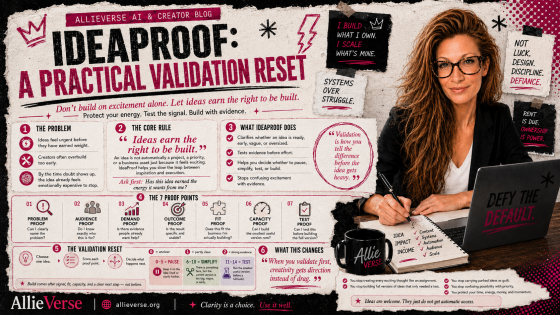
2. IdeaProof
IdeaProof is about validation.
Not vibes.
Not “I love this idea so surely the market will too.”
Actual evidence.
The post helps creators slow down before overbuilding and ask whether an idea has earned the right to become a full project, offer, product, or content series.
The infographic makes the validation process easier to scan.
It gives the reader a visual way to understand that ideas need evidence before they need more effort.
That is especially useful because creators often overbuild from excitement, anxiety, or urgency.
The graphic helps interrupt that pattern.
A little “pause before you pour six weeks of your life into this” energy. Respectfully.
69fe5ececb5a9_lg.png)
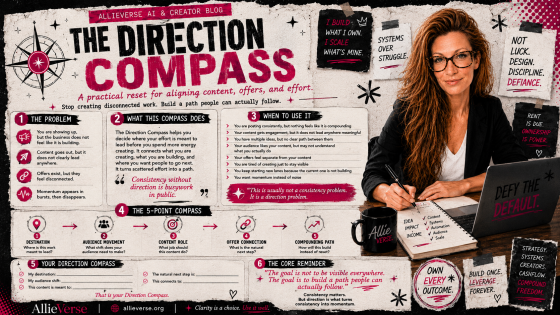
3. The Direction Compass
The Direction Compass helps creators make decisions when everything feels important.
Because that is one of the sneakiest problems in creator business.
It is not always that you have no ideas.
Sometimes you have too many ideas.
Too many possible next steps.
Too many tabs.
Too many people telling you which direction to go.
The post gives creators a way to orient themselves and decide what actually deserves attention next.
The infographic turns that into a visual decision tool.
It helps readers move from mental fog to directional clarity.
Not perfect certainty.
Not a dramatic lightning bolt from the productivity heavens.
Just enough clarity to take the next right step.
69fe5f05c13fc_lg.png)
4. The Friction Audit for Creators
The Friction Audit is about sustainable systems.
Not systems that look impressive in screenshots.
Not color-coded command centers that collapse the second real life enters the room holding a grocery bag, a migraine, and three surprise tasks.
Systems for humans.
The post helps creators identify where their business is creating unnecessary drag.
The infographic makes those friction points visible.
That matters because creators often blame themselves for inconsistency when the real problem is structural.
The system is too heavy.
The steps are unclear.
The process relies on ideal energy.
The workflow only works when nothing interrupts it.
The graphic helps readers spot the drag instead of turning themselves into the villain.
69fe5f39ebff3_lg.png)
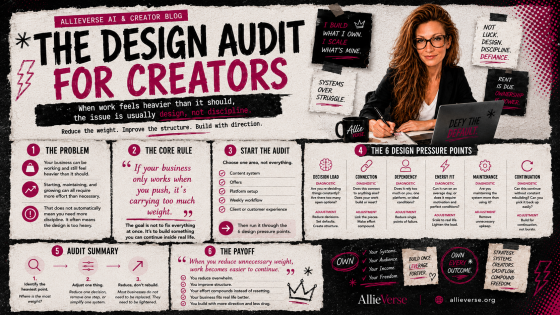
5. The Design Audit for Creators
The Design Audit is about looking at your business, content, offers, and systems through a design lens.
Not just visual design.
Business design.
Experience design.
Decision design.
The post helps creators ask whether the thing they built is actually supporting the outcome they want.
The infographic gives that idea a visual structure.
It helps the reader see design as more than fonts, colors, and layout.
Design is how the pieces work together.
Design is whether the next step is clear.
Design is whether the creator can maintain the system without quietly plotting their escape.
Good design reduces unnecessary effort.
Bad design makes everything feel harder than it should.
69fe5f51c45ce_lg.png)
6. The Clarity Reset
The Clarity Reset is for the moment when the creator brain starts spinning.
Too many options.
Too many priorities.
Too many half-built ideas looking at you from the corner like abandoned houseplants.
The post helps creators return to the basics:
What matters?
What is the actual problem?
What needs to happen next?
What can wait?
The infographic turns that reset process into a visual anchor.
It gives the reader something simple to come back to when their business starts feeling louder than it needs to be.
That is the job of a good visual asset.
It does not replace the deeper work.
It gives people a faster way back into it.
69fe5f97c6187_lg.png)
Why this worked
This worked because the assets were not random.
They were connected to a larger strategy.
Each infographic had a source.
Each source had a purpose.
Each purpose connected back to the AllieVerse OS.
That meant AI had something real to work with.
It was not being asked to manufacture meaning.
It was being asked to translate meaning into another format.
That is where AI becomes powerful for creators.
Not as a replacement for your thinking.
As a force multiplier for thinking you have already clarified.
The real lesson for creators
If you want better AI outputs, do not start by collecting more prompts.
Start by improving the direction you are giving the tool.
Before you ask AI to create something, ask yourself:
- What is this asset supposed to do?
- What existing content is it extending?
- Who is it helping?
- Where will it live?
- How will it support the larger system?
- What should the reader understand faster because this exists?
- How can this asset be reused instead of becoming a one-time content confetti blast?
That is the strategic layer.
That is where the real value lives.
Prompts are useful. Strategy makes them work.
I am not anti-prompt.
Prompts matter.
A clear prompt can save time, reduce confusion, and help the tool produce something closer to what you actually need.
But prompts are not the whole game.
A strong prompt attached to a weak strategy still gives you weak content in a nicer outfit.
A simple prompt attached to a strong strategy can produce assets you can actually use.
That is what happened here.
The infographics were fast because the strategy was already in place.
The AI did not have to guess what I stood for.
It did not have to invent my audience.
It did not have to decide what the blog posts were trying to accomplish.
It had a content system to extend.
That is the creator-first way to use AI.
You are still the asset.
The tool is just the tool.
A very fast, occasionally dramatic, surprisingly useful tool.
But still the tool.
The takeaway
AI can create usable assets in seconds.
But speed is not the same thing as strategy.
The real win is not that ChatGPT can make an infographic quickly.
The real win is that a clear content system can turn one pillar post into multiple useful assets without starting from scratch every time.
That is how content starts to compound.
That is how ideas become reusable.
That is how creators stop feeding the content machine random snacks and start building an ecosystem that actually supports the business.
So yes, use AI.
Use it to create graphics.
Use it to repurpose content.
Use it to test angles.
Use it to make your ideas easier to understand.
Use it to move faster.
But do not hand it the steering wheel before you know where you are going.
Because the prompt is not the strategy.
The prompt is the lever. Strategy is the machine.
FAQ: Using AI to Turn Content Into Visual Assets
Can AI really create usable content assets quickly?
Yes, AI can create usable content assets quickly when it has enough strategic context to work from. In this process, ChatGPT was not starting from a blank page. It had existing pillar blog posts, a clear brand point of view, a defined audience, and a visual style reference. That is why the outputs were useful so quickly.
Why is strategy more important than the prompt?
The prompt gives AI instructions, but strategy gives AI direction. A prompt can tell the tool what to make. Strategy explains why the asset matters, who it is for, what it should help the reader understand, and where it fits in the larger content system.
What makes a good AI prompt for creating infographics?
A good AI prompt for creating infographics should include the source content, the main purpose of the asset, the intended audience, the visual style direction, and how the infographic should help the reader. The clearer the strategy behind the prompt, the stronger the result.
Can ChatGPT help repurpose blog posts into social media content?
Yes. ChatGPT can help turn blog posts into social posts, infographics, email content, carousel ideas, video scripts, community prompts, and training materials. The best results usually come from starting with strong source content instead of asking AI to invent everything from scratch.
How do creators use AI without creating generic content?
Creators can avoid generic AI content by giving the tool clear context: their audience, point of view, brand voice, offer structure, existing content, and the job the asset needs to do. AI works best when it is extending a real strategy, not guessing one.
What is pillar content?
Pillar content is foundational content that explains a core idea, topic, or framework in depth. For creators, pillar blog posts can become the source material for social posts, infographics, emails, videos, lead magnets, and trainings.
How can one blog post become multiple content assets?
One strong blog post can be repurposed into several assets by changing the format while keeping the core message intact. For example, a pillar post can become an infographic, a social media carousel, a Pinterest pin, a short video script, a newsletter section, a community discussion, or a workshop segment.
Is AI content creation just about writing better prompts?
No. Better prompts help, but prompts are only one part of the process. AI content creation becomes more powerful when it is connected to a content strategy, audience clarity, brand positioning, and a clear purpose for every asset.
What should creators do before asking AI to create content?
Before asking AI to create content, creators should know what the asset is supposed to do, who it is helping, what existing content it is extending, where it will be published, and how it supports the larger business or content ecosystem.
What is the biggest takeaway from this AI content workflow?
The biggest takeaway is that AI can move very quickly, but speed only becomes useful when it is guided by strategy. The prompt helps create the asset. The strategy makes the asset worth creating.
Categories: : AllieVerse OS, Clarity, Creator-First, Design, Direction, Systems for Humans, Validation